
Table des matières
GPU Bench
- RTX AI Garage sur blog de nvidia
- Gigabyte Windforce OC 12GB Geforce RTX 3060, 354 €TTC neuve 2025-11
- PNY OC 16 Go Geforce RTX 5060 Ti, 450 €TTC neuve 2025-11
Benchmark d'IA pour extraction de noms :
- avec service Mistral, modèle Codestral =
00j 01h 02m 48s - RTX3060 + Intel-i7, modèle granite-4.0-h-small-Q8_0 =
02j 16h 11m 34s
Selon LeChat:
| Carte graphique | TOPS (INT8) | TOPS (FP16) | Architecture |
|---|---|---|---|
| RTX 3060 (12 Go) | ~120 TOPS | ~60 TOPS | Ampere |
| RTX 5060 Ti (16 Go) | ~759 TOPS | ~380 TOPS | Blackwell |
Bench llama.cpp
-p: Prompt processing (pp): processing a prompt in batches-n: Text generation (tg): generating a sequence of tokens-pg: Prompt processing + text generation (pg): processing a prompt followed by generating a sequence of tokens
- Text generation: tg128, tg256, tg512 :
-p 0 -n 128,256,512 - Prompt processing: b128, b256, b512 :
-p 1024 -n 0 -b 128,256,512
| models | test | tokens/seconds | |||
|---|---|---|---|---|---|
| i7-1360P | i7-1360P SYCL | RTX 3060 | RTX 5060 Ti | ||
| Qwen2.5-coder-7b-instruct-q5_k_m | tg128 | 5.47 | 57.65 | 73.54 | |
| size: 5.07 GiB | tg256 | … | 57.61 | 73.32 | |
| tg512 | … | 56.20 | 71.80 | ||
| b128 | … | 1825.17 | 2840.57 | ||
| b256 | … | 1924.10 | 3209.52 | ||
| b512 | … | 1959.18 | 3271.22 | ||
| Qwen2.5-coder-7b-instruct-q8_0 | tg128 | … | 41.42 | 50.33 | |
| size: 7.54 GiB | tg256 | … | 41.38 | 50.33 | |
| tg512 | … | 40.70 | 49.62 | ||
| b128 | 13.98 | 36.34 | 1952.96 | 2972.52 | |
| b256 | … | 42.28 | 2054.09 | 3460.41 | |
| b512 | … | 45.99 | 2093.21 | 3511.29 | |
| EuroLLM-9B-Instruct-Q4_0 | tg128 | … | 56.06 | 71.41 | |
| size: 4.94 GiB | tg256 | … | 55.96 | 71.15 | |
| tg512 | … | 53.87 | 69.45 | ||
| b128 | … | 1433.95 | CUDA error | ||
| b256 | … | 1535.06 | … | ||
| b512 | … | 1559.88 | … | ||
| Qwen3-14B-UD-Q5_K_XL | tg128 | … | 30.00 | 37.66 | |
| size: 9.82 GiB | tg256 | … | 29.97 | 38.17 | |
| tg512 | … | 29.25 | 37.30 | ||
| b128 | … | 903.97 | CUDA error | ||
| b256 | … | 951.71 | … | ||
| b512 | … | 963.76 | … | ||
| Qwen3-4B-UD-Q8_K_XL | tg128 | 7.37 | 56.35 | … | |
| size: 4.70 GiB | tg256 | 6.63 | 56.35 | … | |
| tg512 | 6.24 | 54.56 | … | ||
| b128 | 20.66 | 2163.17 | … | ||
| b256 | … | 2405.27 | … | ||
| b512 | … | 2495.35 | … | ||
| GemmaCoder3-12B-IQ4_NL.gguf | tg128 | … | 40.70 | … | |
| size: 6.41 GiB | tg256 | … | 40.67 | … | |
| tg512 | … | 39.54 | … | ||
| b128 | … | 1150.11 | … | ||
| b256 | … | 1218.27 | … | ||
| b512 | … | 1253.92 | … | ||
| Gemma3-Code-Reasoning-4B.Q8_0 | tg128 | … | 66.98 | … | |
| size: 3.84 GiB | tg256 | … | 66.95 | … | |
| tg512 | … | 65.75 | … | ||
| b128 | … | 2885.80 | … | ||
| b256 | … | 3266.87 | … | ||
| b512 | … | 3457.03 | … | ||
| GemmaCoder3-12B-Q5_K_M | tg128 | … | 34.10 | … | |
| size: 7.86 GiB | tg256 | … | 34.06 | … | |
| tg512 | … | 33.28 | … | ||
| b128 | … | 1045.27 | … | ||
| b256 | … | 1108.95 | … | ||
| b512 | … | 1144.97 | … | ||
| gpt-oss 20B MXFP4 MoE | tg128 | … | 92.86 | … | |
| gpt-oss-20b-mxfp4.gguf | tg256 | … | 92.69 | … | |
| size: 11.27 GiB | tg512 | … | 88.17 | … | |
| b128 | … | 1036.08 | … | ||
| b256 | … | 1452.01 | … | ||
| b512 | … | 1744.71 | … | ||
| gpt-oss 20B Q4_K - Medium | tg128 | … | 98.05 | … | |
| gpt-oss-20b-UD-Q4_K_XL.gguf | tg256 | … | 97.20 | … | |
| size: 11.04 GiB | tg512 | … | 92.43 | … | |
| b128 | … | 1034.15 | … | ||
| b256 | … | 1450.77 | … | ||
| b512 | … | 1734.35 | … | ||
- Les “CUDA error” apparaissent avec la RTX 5060 Ti et le bridge PCIe/THB4 “Wikingoo L17” et le driver nvidia 580.
- Avec le CPU, laisser le nombre de cœurs en automatique, ce sont les physiques qui seront utilisés. Si on force plus de thread, les perfs diminuent.
- le multi-threads physique est utile. Ex: en auto 7.37 t/s, avec 1 thread 3.39 t/s
Intel® Core™ i7-1360P 13th Gen
Pour comparaison …
Qwen2.5-coder-7b-instruct-q5_k_m:
./llama-bench -m ~/Data/AI_Models/Qwen2.5-coder-7b-instruct-q5_k_m.gguf -p 0 -n 128
load_backend: loaded RPC backend from /home/.../llama-b7109/libggml-rpc.so
load_backend: loaded CPU backend from /home/.../llama-b7109/libggml-cpu-alderlake.so
| model                          |       size |     params | backend    | threads |            test |                  t/s |
| ------------------------------ | ---------: | ---------: | ---------- | ------: | --------------: | -------------------: |
| qwen2 7B Q5_K - Medium         |   5.07 GiB |     7.62 B | CPU        |       4 |           tg128 |          5.47 ± 0.72 |
Gigabyte Windforce OC 12GB Geforce RTX 3060
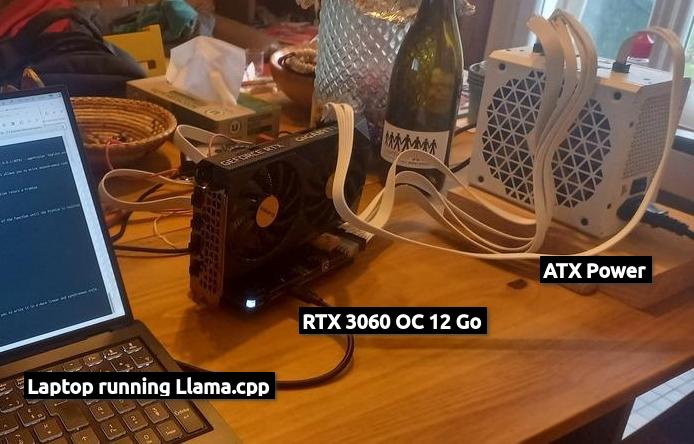
Avec sudo nsys-ui :
| NVIDIA GeForce RTX 3060 | |
|---|---|
| Chip Name | GA104 |
| SM Count | 28 |
| L2 Cache Size | 2,25 MiB |
| Memory Bandwidth | 335,32 GiB/s |
| Memory Size | 11,63 GiB |
| Core Clock | 1,79 GHz |
| Bus Location | 0000:05:00.0 |
| GSP firmware version | 580.105.08 |
| Video accelerator tracing | Supported |
Avec llama.cpp et CUDA 12.9.
Qwen2.5-coder-7b-instruct-q5_k_m
./build/bin/llama-bench -m ~/Data/AI_Models/Qwen2.5-coder-7b-instruct-q5_k_m.gguf -p 0 -n 128,256,512
ggml_cuda_init: GGML_CUDA_FORCE_MMQ:    no
ggml_cuda_init: GGML_CUDA_FORCE_CUBLAS: no
ggml_cuda_init: found 1 CUDA devices:
  Device 0: NVIDIA GeForce RTX 3060, compute capability 8.6, VMM: yes
| model                          |       size |     params | backend    | ngl |            test |                  t/s |
| ------------------------------ | ---------: | ---------: | ---------- | --: | --------------: | -------------------: |
| qwen2 7B Q5_K - Medium         |   5.07 GiB |     7.62 B | CUDA       |  99 |           tg128 |         57.65 ± 0.03 |
| qwen2 7B Q5_K - Medium         |   5.07 GiB |     7.62 B | CUDA       |  99 |           tg256 |         57.61 ± 0.03 |
| qwen2 7B Q5_K - Medium         |   5.07 GiB |     7.62 B | CUDA       |  99 |           tg512 |         56.24 ± 0.05 |
GemmaCoder3-12B-Q5_K_M
Pour lancer llama-server avec le modèle “GemmaCoder3-12B-Q5_K_M.gguf” (fichier 8.4Go) fait de 49 layers en utilisant son contexte maximale “131072” avec --ctx-size 0 au lieu du par défaut “4096” il faut décharger des layers sur le CPU, sinon c'est main: error: unable to load model. À noter que c'est pareil avec llama-cli.
| n-gpu-layers | test | tokens/s | time | % perte perf |
|---|---|---|---|---|
| (all) 49 | tg128 | 34.15 | 0m25,904s | 0.00% |
| b128 | 1041.60 | 0m13,117s | 0.00% | |
| 44 | tg128 | 15.55 | 0m48,049s | 54.47% |
| b128 | 279.26 | 0m28,613s | 73.19% | |
| 39 | tg128 | 10.74 | 1m07,555s | 68.55% |
| b128 | 150.49 | 0m46,996s | 85.55% | |
| 30 | tg128 | 6.83 | 1m42,221s | 80.01% |
| b128 | 82.91 | 1m19,729s | 92.04% | |
| full cpu | tg128 | 3.12 | 3m28,308s | 90.86% |
| b128 | 4.50 | 22m37,674s | 99.57% |
Les valeurs qui permettent de charger ce modèle :
llama-cli:- avec son context max 131072 c'est 30 layers sur GPU :
--n-gpu-layers 30, donc 80% perte perf --ctx-size 70000 --n-gpu-layers 41- et pour tous les layers sur le GPU :
--ctx-size 42000
llama-server:--ctx-size 40000 --n-gpu-layers 44--ctx-size 43500 --n-gpu-layers 43--ctx-size 52500 --n-gpu-layers 42
Avec --ctx-size 52500 --n-gpu-layers 42 :
...
NVIDIA GeForce RTX 3060, compute capability 8.6, VMM: yes
...
print_info: n_ctx_train      = 131072
print_info: n_embd           = 3840
print_info: n_embd_inp       = 3840
print_info: n_layer          = 48
print_info: n_head           = 16
print_info: n_head_kv        = 8
print_info: n_rot            = 256
print_info: n_swa            = 1024
print_info: is_swa_any       = 1
print_info: n_embd_head_k    = 256
print_info: n_embd_head_v    = 256
print_info: n_gqa            = 2
print_info: n_embd_k_gqa     = 2048
print_info: n_embd_v_gqa     = 2048
print_info: f_norm_eps       = 0.0e+00
print_info: f_norm_rms_eps   = 1.0e-06
print_info: f_clamp_kqv      = 0.0e+00
print_info: f_max_alibi_bias = 0.0e+00
print_info: f_logit_scale    = 0.0e+00
print_info: f_attn_scale     = 6.2e-02
print_info: n_ff             = 15360
print_info: n_expert         = 0
print_info: n_expert_used    = 0
print_info: n_expert_groups  = 0
print_info: n_group_used     = 0
print_info: causal attn      = 1
print_info: pooling type     = 0
print_info: rope type        = 2
print_info: rope scaling     = linear
print_info: freq_base_train  = 1000000.0
print_info: freq_scale_train = 0.125
print_info: n_ctx_orig_yarn  = 131072
print_info: rope_finetuned   = unknown
print_info: model type       = 12B
print_info: model params     = 11.77 B
print_info: general.name     = gemma-3-12b-it-codeforces-SFT
print_info: vocab type       = SPM
print_info: n_vocab          = 262208
print_info: n_merges         = 0
...
print_info: max token length = 48
...
load_tensors: offloading 42 repeating layers to GPU
load_tensors: offloaded 42/49 layers to GPU
load_tensors:   CPU_Mapped model buffer size =  1720.59 MiB
load_tensors:        CUDA0 model buffer size =  6327.03 MiB
llama_context: constructing llama_context
llama_context: n_seq_max     = 4
llama_context: n_ctx         = 52736
llama_context: n_ctx_seq     = 52736
llama_context: n_batch       = 2048
llama_context: n_ubatch      = 512
llama_context: causal_attn   = 1
llama_context: flash_attn    = auto
llama_context: kv_unified    = true
llama_context: freq_base     = 1000000.0
llama_context: freq_scale    = 0.125
llama_context: n_ctx_seq (52736) < n_ctx_train (131072) -- the full capacity of the model will not be utilized
llama_context:        CPU  output buffer size =     4.00 MiB
llama_kv_cache_iswa: creating non-SWA KV cache, size = 52736 cells
llama_kv_cache:        CPU KV buffer size =   412.00 MiB
llama_kv_cache:      CUDA0 KV buffer size =  2884.00 MiB
llama_kv_cache: size = 3296.00 MiB ( 52736 cells,   8 layers,  4/1 seqs), K (f16): 1648.00 MiB, V (f16): 1648.00 MiB
llama_kv_cache_iswa: creating     SWA KV cache, size = 4608 cells
llama_kv_cache:        CPU KV buffer size =   180.00 MiB
llama_kv_cache:      CUDA0 KV buffer size =  1260.00 MiB
llama_kv_cache: size = 1440.00 MiB (  4608 cells,  40 layers,  4/1 seqs), K (f16):  720.00 MiB, V (f16):  720.00 MiB
llama_context: Flash Attention was auto, set to enabled
llama_context:      CUDA0 compute buffer size =  1307.32 MiB
llama_context:  CUDA_Host compute buffer size =   120.02 MiB
llama_context: graph nodes  = 1929
llama_context: graph splits = 94 (with bs=512), 27 (with bs=1)
PNY OC 16 Go Geforce RTX 5060 Ti
Avec vrai PCIe ✅
Sur une vrai tour avec PCIe x16 et Intel(R) Core(TM) Ultra 7 270K Plus.
Environnement et compilation sensible pour llama.cpp :
| Modèle | params | Offload GPU | Prompt (t/s) | Eval (t/s) | Total (ms) | Tokens générés | Graphs reused |
|---|---|---|---|---|---|---|---|
| Devstral-Small-2-24B-Instruct-2512-UD-Q4_K_XL | 24B | 17/41 | 427.81 – 545.85 | 0.80 – 3.19 | 123,500 – 568,458 | 9,629 – 47,241 | 0 |
| Qwen3-Coder-30B-A3B-Instruct-UD-Q4_K_XL | 30B | 49/49 | 590.38 – 591.76 | 28.64 – 30.06 | 4,715 – 12,818 | 19,919 – 22,804 | 294 – 530 |
| Qwen3-Coder-Next-UD-Q4_K_XL | 80B | 49/49 | 29.00 – 400.09 | 18.68 – 32.44 | 25,057 – 87,659 | 719 – 43,214 | 10 – 1,024 |
| DeepSeek-R1-Distill-Qwen-32B-Q4_K_M | 32B | 24/65 | 88.97 – 428.81 | 2.14 – 2.32 | 116,052 – 189,566 | 925 – 3,397 | 228 – 419 |
| DeepSeek-R1-Distill-Qwen-14B-Q8_0 | 14B | 24/49 | 225.55 – 775.01 | 4.10 – 4.13 | 81,383 – 147,476 | 1,307 – 3,858 | 313 – 582 |
gpt-oss-20b-UD-Q4_K_XL
$ ./llama.cpp/build/bin/llama-bench -m /data/models/gpt-oss-20b-UD-Q4_K_XL.gguf -p 0 -n 128,256,512
ggml_cuda_init: found 1 CUDA devices (Total VRAM: 15849 MiB):
  Device 0: NVIDIA GeForce RTX 5060 Ti, compute capability 12.0, VMM: yes, VRAM: 15849 MiB
| model                     |       size |     params | backend | ngl |    test |            t/s |
| ------------------------- | ---------: | ---------: | ------- | --: | ------: | -------------: |
| gpt-oss 20B Q4_K - Medium |  11.04 GiB |    20.91 B | CUDA    |  -1 |   tg128 |  155.79 ± 0.21 |
| gpt-oss 20B Q4_K - Medium |  11.04 GiB |    20.91 B | CUDA    |  -1 |   tg256 |  155.81 ± 0.03 |
| gpt-oss 20B Q4_K - Medium |  11.04 GiB |    20.91 B | CUDA    |  -1 |   tg512 |  155.15 ± 0.01 |

build: e25a32e98 (9584)

$ ./llama.cpp/build/bin/llama-bench -m /data/models/gpt-oss-20b-UD-Q4_K_XL.gguf -p 1024 -n 0 -b 128,256,512
ggml_cuda_init: found 1 CUDA devices (Total VRAM: 15849 MiB):
  Device 0: NVIDIA GeForce RTX 5060 Ti, compute capability 12.0, VMM: yes, VRAM: 15849 MiB
| model                     |       size |  params | backend | ngl | n_batch |    test |             t/s |
| ------------------------- | ---------: | ------: | ------- | --: | ------: | ------: | --------------: |
| gpt-oss 20B Q4_K - Medium |  11.04 GiB | 20.91 B | CUDA    |  -1 |     128 |  pp1024 | 3308.23 ± 19.28 |
| gpt-oss 20B Q4_K - Medium |  11.04 GiB | 20.91 B | CUDA    |  -1 |     256 |  pp1024 | 4792.27 ± 39.25 |
| gpt-oss 20B Q4_K - Medium |  11.04 GiB | 20.91 B | CUDA    |  -1 |     512 |  pp1024 | 6048.13 ± 32.16 |

build: e25a32e98 (9584)
Qwen2.5-coder-7b-instruct-q8_0
$ ./llama.cpp/build/bin/llama-bench -m ~/models/Qwen2.5-coder-7b-instruct-q8_0.gguf -p 0 -n 128,256,512
ggml_cuda_init: found 1 CUDA devices (Total VRAM: 15849 MiB):
  Device 0: NVIDIA GeForce RTX 5060 Ti, compute capability 12.0, VMM: yes, VRAM: 15849 MiB
| model            |       size |     params | backend   | ngl |        test |               t/s |
| ---------------- | ---------: | ---------: | --------- | --: | ----------: | ----------------: |
| qwen2 7B Q8_0    |   7.54 GiB |     7.62 B | CUDA      |  -1 |       tg128 |      54.23 ± 0.02 |
| qwen2 7B Q8_0    |   7.54 GiB |     7.62 B | CUDA      |  -1 |       tg256 |      54.23 ± 0.00 |
| qwen2 7B Q8_0    |   7.54 GiB |     7.62 B | CUDA      |  -1 |       tg512 |      54.12 ± 0.00 |

build: e25a32e98 (9584)

$ ./llama.cpp/build/bin/llama-bench -m ~/models/Qwen2.5-coder-7b-instruct-q8_0.gguf -p 1024 -n 0 -b 128,256,512
ggml_cuda_init: found 1 CUDA devices (Total VRAM: 15849 MiB):
  Device 0: NVIDIA GeForce RTX 5060 Ti, compute capability 12.0, VMM: yes, VRAM: 15849 MiB
| model            |       size |     params | backend   | ngl | n_batch |      test |              t/s |
| ---------------- | ---------: | ---------: | --------- | --: | ------: | --------: | ---------------: |
| qwen2 7B Q8_0    |   7.54 GiB |     7.62 B | CUDA      |  -1 |     128 |    pp1024 |   3746.31 ± 4.80 |
| qwen2 7B Q8_0    |   7.54 GiB |     7.62 B | CUDA      |  -1 |     256 |    pp1024 |   4174.39 ± 0.45 |
| qwen2 7B Q8_0    |   7.54 GiB |     7.62 B | CUDA      |  -1 |     512 |    pp1024 |   4354.18 ± 5.39 |

build: e25a32e98 (9584)
Qwen2.5-coder-14b-instruct-q5_k_m
$ ./llama.cpp/build/bin/llama-bench -m ~/models/Qwen2.5-coder-14b-instruct-q5_k_m.gguf -p 0 -n 128,256,512
ggml_cuda_init: found 1 CUDA devices (Total VRAM: 15849 MiB):
  Device 0: NVIDIA GeForce RTX 5060 Ti, compute capability 12.0, VMM: yes, VRAM: 15849 MiB
| model                   |       size |   params | backend | ngl |     test |             t/s |
| ----------------------- | ---------: | -------: | ------- | --: | -------: | --------------: |
| qwen2 14B Q5_K - Medium |   9.78 GiB |  14.77 B | CUDA    |  -1 |    tg128 |    39.54 ± 0.02 |
| qwen2 14B Q5_K - Medium |   9.78 GiB |  14.77 B | CUDA    |  -1 |    tg256 |    39.53 ± 0.01 |
| qwen2 14B Q5_K - Medium |   9.78 GiB |  14.77 B | CUDA    |  -1 |    tg512 |    39.38 ± 0.01 |

build: e25a32e98 (9584)

  Device 0: NVIDIA GeForce RTX 5060 Ti, compute capability 12.0, VMM: yes, VRAM: 15849 MiB
| model                   |       size |   params | backend | ngl | n_batch |    test |             t/s |
| ----------------------- | ---------: | -------: | ------- | --: | ------: | ------: | --------------: |
| qwen2 14B Q5_K - Medium |   9.78 GiB |  14.77 B | CUDA    |  -1 |     128 |  pp1024 |  1835.16 ± 1.69 |
| qwen2 14B Q5_K - Medium |   9.78 GiB |  14.77 B | CUDA    |  -1 |     256 |  pp1024 |  1967.12 ± 1.01 |
| qwen2 14B Q5_K - Medium |   9.78 GiB |  14.77 B | CUDA    |  -1 |     512 |  pp1024 |  1995.02 ± 0.84 |

build: e25a32e98 (9584)
gemma-4-26B-A4B-it-qat-UD-Q4_K_XL
prompt eval time =     318.17 ms /   165 tokens (    1.93 ms per token,   518.59 tokens per second)
       eval time =    1338.88 ms /    86 tokens (   15.57 ms per token,    64.23 tokens per second)
      total time =    1657.05 ms /   251 tokens
   graphs reused =       1916
stop processing: n_tokens = 20931, truncated = 0

prompt eval time =    3143.73 ms /  4850 tokens (    0.65 ms per token,  1542.75 tokens per second)
       eval time =   31502.45 ms /  1854 tokens (   16.99 ms per token,    58.85 tokens per second)
      total time =   34646.18 ms /  6704 tokens
   graphs reused =       3762
stop processing: n_tokens = 27604, truncated = 0
Qwen3-Coder-30B-A3B-Instruct-UD-Q4_K_XL
RTX 5060 Ti + Ultra 7 270K.
Device 0: NVIDIA GeForce RTX 5060 Ti, compute capability 12.0, VMM: yes, VRAM: 15849 MiB

| model                          |       size |     params | backend    |
| ------------------------------ | ---------: | ---------: | ---------- |
| qwen3moe 30B.A3B Q4_K - Medium |  16.45 GiB |    30.53 B | CUDA       |
| qwen3moe 30B.A3B Q4_K - Medium |  16.45 GiB |    30.53 B | CUDA       |
| qwen3moe 30B.A3B Q4_K - Medium |  16.45 GiB |    30.53 B | CUDA       |
build: 931eb37f8 (9848)
$ ./llama.cpp/build/bin/llama-bench -m /data/models/Qwen3-Coder-30B-A3B-Instruct-UD-Q4_K_XL.gguf -p 0 -n 128,256,512

ggml_cuda_init: found 1 CUDA devices (Total VRAM: 15849 MiB):
  Device 0: NVIDIA GeForce RTX 5060 Ti, compute capability 12.0, VMM: yes, VRAM: 15849 MiB
| ngl |            test |                  t/s |
| --: | --------------: | -------------------: |
llama_bench: error: failed to load model '/data/models/Qwen3-Coder-30B-A3B-Instruct-UD-Q4_K_XL.gguf'
Comparaison des perfs en jouant sur la décharge des MoE sur le CPU.
$ llama-bench -m Qwen3-Coder-30B-A3B-Instruct-UD-Q4_K_XL.gguf -p 1024 -n 0 -b 128,256,512 --n-cpu-moe 6 --n-gpu-layers 99
| ngl |  n_cpu_moe | n_batch |            test |                  t/s |
| --: | ---------: | ------: | --------------: | -------------------: |
|  99 |          6 |     128 |          pp1024 |        697.99 ± 4.45 |
|  99 |          6 |     256 |          pp1024 |       1174.76 ± 9.12 |
|  99 |          6 |     512 |          pp1024 |       1886.14 ± 9.84 |

$ llama-bench -m Qwen3-Coder-30B-A3B-Instruct-UD-Q4_K_XL.gguf -p 1024 -n 0 -b 128,256,512 --n-gpu-layers 44
| ngl | n_batch |            test |                  t/s |
| --: | ------: | --------------: | -------------------: |
|  44 |     128 |          pp1024 |        730.75 ± 4.96 |
|  44 |     256 |          pp1024 |       1228.75 ± 7.90 |
|  44 |     512 |          pp1024 |       1959.76 ± 7.00 |
$ llama-bench -m Qwen3-Coder-30B-A3B-Instruct-UD-Q4_K_XL.gguf -p 0 -n 128,256,512 --n-cpu-moe 6 --n-gpu-layers 99
| ngl |  n_cpu_moe |            test |                  t/s |
| --: | ---------: | --------------: | -------------------: |
|  99 |          6 |           tg128 |         94.79 ± 5.26 |
|  99 |          6 |           tg256 |         95.48 ± 1.26 |
|  99 |          6 |           tg512 |         95.12 ± 3.66 |

$ llama-bench -m Qwen3-Coder-30B-A3B-Instruct-UD-Q4_K_XL.gguf -p 0 -n 128,256,512 --n-gpu-layers 44
| ngl |            test |                  t/s |
| --: | --------------: | -------------------: |
|  44 |           tg128 |         98.73 ± 0.53 |
|  44 |           tg256 |         97.58 ± 0.10 |
|  44 |           tg512 |         94.90 ± 0.09 |
Qwen3-Coder-Next-UD-Q4_K_XL (80B)
voir le chapitre dédié.
Nemotron-Cascade-2-30B-A3B
RTX 5060 Ti + Ultra 7 270K.
  Device 0: NVIDIA GeForce RTX 5060 Ti, compute capability 12.0, VMM: yes, VRAM: 15849 MiB
| model                          |       size |     params | backend    |
| ------------------------------ | ---------: | ---------: | ---------- |
| nemotron_h_moe 31B.A3.5B Q4_K - Medium |  23.02 GiB |    31.58 B | CUDA       |
build: 931eb37f8 (9848)
$ llama-bench -m Nemotron-Cascade-2-30B-A3B-Q4_K_M.gguf -p 0 -n 128,256,512
ggml_cuda_init: found 1 CUDA devices (Total VRAM: 15849 MiB):
  Device 0: NVIDIA GeForce RTX 5060 Ti, compute capability 12.0, VMM: yes, VRAM: 15849 MiB
| model                          |       size |     params | backend    | ngl |            test |                  t/s |
| ------------------------------ | ---------: | ---------: | ---------- | --: | --------------: | -------------------: |
llama_bench: error: failed to load model '/data/models/Nemotron-Cascade-2-30B-A3B-Q4_K_M.gguf'
$ llama-bench -m Nemotron-Cascade-2-30B-A3B-Q4_K_M.gguf -p 0 -n 128,256,512 --n-gpu-layers 32
| ngl |            test |                  t/s |
| --: | --------------: | -------------------: |
|  32 |           tg128 |         32.65 ± 0.24 |
|  32 |           tg256 |         32.69 ± 0.34 |
|  32 |           tg512 |         32.72 ± 0.11 |

$ llama-bench -m Nemotron-Cascade-2-30B-A3B-Q4_K_M.gguf -p 0 -n 128,256,512 --n-cpu-moe 24 --n-gpu-layers 99
| ngl |  n_cpu_moe |            test |                  t/s |
| --: | ---------: | --------------: | -------------------: |
|  99 |         24 |           tg128 |         54.37 ± 0.12 |
|  99 |         24 |           tg256 |         54.44 ± 0.02 |
|  99 |         24 |           tg512 |         54.08 ± 0.30 |
$ llama-bench -m Nemotron-Cascade-2-30B-A3B-Q4_K_M.gguf -p 1024 -n 0 -b 128,256,512 --n-gpu-layers 32
| ngl | n_batch |            test |                  t/s |
| --: | ------: | --------------: | -------------------: |
|  32 |     128 |          pp1024 |        214.26 ± 0.55 |
|  32 |     256 |          pp1024 |        370.70 ± 2.07 |
|  32 |     512 |          pp1024 |        638.52 ± 7.24 |

$ llama-bench -m Nemotron-Cascade-2-30B-A3B-Q4_K_M.gguf -p 1024 -n 0 -b 128,256,512 --n-cpu-moe 24 --n-gpu-layers 99
| ngl |  n_cpu_moe | n_batch |            test |                  t/s |
| --: | ---------: | ------: | --------------: | -------------------: |
|  99 |         24 |     128 |          pp1024 |        242.47 ± 1.27 |
|  99 |         24 |     256 |          pp1024 |        422.45 ± 3.50 |
|  99 |         24 |     512 |          pp1024 |       750.21 ± 11.20 |
INstabilité avec eGPU 😩
Reset nvidia et CUDA:
$ sudo rmmod nvidia_uvm nvidia
- Lucie-7B_OpenLLM-France.Instruct-human-data.Q8_0.gguf
- Meta-Llama-3.1-8B-Instruct-Q8_0.gguf
- CUDA0 model buffer size = 7605,33 MiB
- CUDA0 compute buffer size = 258,50 MiB
Après 2 mois de re-essais avec des configs grub et modprobe de toutes sortes avec l'aide de forums et d'assistants (Claude, ChatGpt, LeChat), une solution apparaît sur ce ticket : forcer le PCI en “Gen 3”
# Pour récupérer l'adresse PCI "0000:05:00.0" de la RTX:
lspci | grep -i nvidia

sudo lspci -vvv -s 0000:05:00.0 | grep -i "LnkCap\|LnkSta"
   LnkCap:	Port #0, Speed 32GT/s, Width x8, ASPM L1, Exit Latency L1 unlimited
   LnkSta:	Speed 8GT/s (downgraded), Width x4 (downgraded)
   LnkCap2: Supported Link Speeds: 2.5-32GT/s, Crosslink- Retimer+ 2Retimers+ DRS-
   LnkSta2: Current De-emphasis Level: -6dB, EqualizationComplete+ EqualizationPhase1+

sudo setpci -s 0000:05:00.0 CAP_EXP+0xC.W=0x0003

sudo lspci -vvv -s 0000:05:00.0 | grep -i "LnkCap\|LnkSta"
   LnkCap:	Port #0, Speed 32GT/s, Width x8, ASPM L1, Exit Latency L1 unlimited
   LnkSta:	Speed 2.5GT/s (downgraded), Width x4 (downgraded)
   LnkCap2: Supported Link Speeds: 2.5-32GT/s, Crosslink- Retimer+ 2Retimers+ DRS-
   LnkSta2: Current De-emphasis Level: -6dB, EqualizationComplete+ EqualizationPhase1+
Mais non, ça a bien fonctionné avec llama-bench mais pas avec Yolo: 😩
kernel: NVRM: GPU at PCI:0000:05:00: GPU-ab296f23-e6a6-a23b-b6c1-33f9b813df84
kernel: NVRM: GPU Board Serial Number: 0
kernel: NVRM: Xid (PCI:0000:05:00): 13, Graphics Exception: Class 0xffff Subchannel 0x0 Mismatch
kernel: NVRM: Xid (PCI:0000:05:00): 13, Graphics Exception: ESR 0x4041b0=0x3f20ffff
kernel: NVRM: Xid (PCI:0000:05:00): 13, Graphics Exception: ESR 0x404000=0x80000002
kernel: NVRM: Xid (PCI:0000:05:00): 13, pid=6871, name=python3, Graphics Exception: channel 0x00000002, Class 0000cec0, Offset 00000100, Data deaddead
Qwen3-Coder-Next 80B
Focus sur le modèle Qwen3-Coder-Next 80B With only 3B activated parameters (80B total parameters), it achieves performance comparable to models with 10–20x more active parameters, making it highly cost-effective for agent deployment..
Avec la “RTX 5060 Ti” avec 16 Go de VRAM connectée sur une “ASUS ProArt Z890-Creator” avec un “Intel Core Ultra 7 270K Plus” et 96 Go de DDR5 (2×48).
Llama.cpp build: 082b326fc (9951)
exploration des paramètres :
–threadsnumber of CPU threads to use during generation–n-cpu-moe–override-tensor
Device 0: NVIDIA GeForce RTX 5060 Ti, compute capability 12.0, VMM: yes, VRAM: 15849 MiB
| model                          |       size |     params |
| ------------------------------ | ---------: | ---------: |
| qwen3next 80B.A3B Q4_K - Medium |  46.20 GiB |    79.67 B |
| qwen3next 80B.A3B Q4_K - Medium |  46.20 GiB |    79.67 B |
| qwen3next 80B.A3B Q4_K - Medium |  46.20 GiB |    79.67 B |
build: 931eb37f8 (9848)
--ubatch-size
Avec un grand context: 196 k
–ubatch-sizedéfinit la taille du graphe de calcul réellement exécuté sur le GPU à chaque passe. C'est lui qui dimensionne les buffers de calcul intermédiaires (mul_mat_q, attention)
$ llama-bench -m Qwen3-Coder-Next-UD-Q4_K_XL.gguf --mmap 0 --direct-io 1 \
 --n-cpu-moe 39 --n-gpu-layers 99 --fit-ctx 196000 \
 --flash-attn on --cache-type-k q8_0 --cache-type-v q8_0 \
 --threads 7,8 -p 8192,16384 -n 256,512 -b 4096,8192 -ub 1024,2048,3072
| threads | ubatch | pp8192 (t/s) | pp16384 (t/s) | tg256 (t/s) | tg512 (t/s) |
| 7 | 1024 | 873.6 | 866.7 | 37.8 | 36.4 |
| 8 | 1024 | 871.9 | 866.1 | 38.7 | 39.8 |
| 7 | 2048 | 1121.7 | 1108.8 | 40.3 | 38.9 |
| 8 | 2048 | 1125.7 | 1107.6 | 38.0 | 39.4 |
| 7 | 3072 | 1108.6 | crash | — | — |
L'allocateur VMM CUDA de ggml gère un pool réservé par device qui a tendance à grossir au fil des configurations testées dans le même process, sans forcément être libéré/réduit entre deux réglages de contexte successifs. Du coup je passe à des commandes isolées.
./llama.cpp/build/bin/llama-bench -m /data/models/Qwen3-Coder-Next-UD-Q4_K_XL.gguf --mmap 0 --direct-io 1 \
 --n-cpu-moe 39 --n-gpu-layers 99 --flash-attn on --cache-type-k q8_0 --cache-type-v q8_0 \
 --threads 8 --fit-ctx 196000

-p 32768 -n 256 -b 4096,8192 -ub 2048,2560

| n_batch | n_ubatch |            test |                  t/s |
| ------: | -------: | --------------: | -------------------: |
|    4096 |     2048 |         pp32768 |       1073.39 ± 1.15 |
|    4096 |     2560 |         pp32768 |       1072.82 ± 1.55 |
|    8192 |     2048 |         pp32768 |       1071.79 ± 1.34 |
|    8192 |     2560 |         pp32768 |       1081.85 ± 1.80 |

Le débit en pp plafonne après ub=2048.

Avec -p 65536 ça plante ...

Décharger un MoE pour un micro-batch plus grand n'est pas le bon chemin !
|  n_cpu_moe | n_batch | n_ubatch |            test |                  t/s |
| ---------: | ------: | -------: | --------------: | -------------------: |
|         40 |    8192 |     2048 |        pp131072 |        885.22 ± 0.73 |
Avec llama-batched-bench :
#!/usr/bin/bash
LLAMA_DIR="$HOME/llama.cpp/build/bin"
MODEL_DIR="/data/models"
# https://huggingface.co/unsloth/Qwen3-Coder-Next-GGUF
MODEL="Qwen3-Coder-Next-UD-Q4_K_XL.gguf"

#
# ne gère pas options multiples pour "-ub" et "-b"
# -b 2048,4096,6144,8192
# -ub 1024,1536,2048,2560
#

"$LLAMA_DIR/llama-batched-bench" -m "$MODEL_DIR/$MODEL" \
  -c 196000 \
  -b 2048 \
  -ub 1024 \
  -ngl 99 \
  --n-cpu-moe 39 \
  --cache-type-k q8_0 --cache-type-v q8_0 \
  --threads 8 \
  --temp 1.0 --top-p 0.95 --top-k 40 --min-p 0.01 --repeat-penalty 1.0 \
  --flash-attn on \
  -npp 512,1024,2048,4096 \
  -ntg 32,64,128 \
  -npl 1 \
  --output-format md

== Résultats:

llama_batched_bench: n_kv_max = 196096, n_batch = 2048, n_ubatch = 1024, flash_attn = 1,
is_pp_shared = 0, is_tg_separate = 0, n_gpu_layers = 99, n_threads = 8, n_threads_batch = 8

|    PP |     TG |    B |   N_KV |   T_PP s | S_PP t/s |   T_TG s | S_TG t/s |      T s |    S t/s |
|-------|--------|------|--------|----------|----------|----------|----------|----------|----------|
|   512 |     32 |    1 |    544 |    1.752 |   292.21 |    0.835 |    38.32 |    2.587 |   210.26 |
|   512 |     64 |    1 |    576 |    1.681 |   304.54 |    1.634 |    39.17 |    3.315 |   173.75 |
|   512 |    128 |    1 |    640 |    1.677 |   305.36 |    3.422 |    37.41 |    5.098 |   125.53 |
|  1024 |     32 |    1 |   1056 |    2.124 |   482.20 |    0.838 |    38.18 |    2.962 |   356.54 |
|  1024 |     64 |    1 |   1088 |    2.139 |   478.71 |    1.669 |    38.35 |    3.808 |   285.70 |
|  1024 |    128 |    1 |   1152 |    2.156 |   474.87 |    3.327 |    38.47 |    5.484 |   210.07 |
|  2048 |     32 |    1 |   2080 |    4.304 |   475.82 |    0.845 |    37.88 |    5.149 |   403.97 |
|  2048 |     64 |    1 |   2112 |    4.422 |   463.18 |    1.675 |    38.20 |    6.097 |   346.41 |
|  2048 |    128 |    1 |   2176 |    4.419 |   463.44 |    3.347 |    38.24 |    7.766 |   280.19 |
--n-cpu-moe
Comparaison des perfs en jouant sur la décharge des MoE sur le CPU.
“Génération”:
$ llama-bench -m Qwen3-Coder-Next-UD-Q4_K_XL.gguf -p 0 -n 128,256,512 --n-cpu-moe 35 --n-gpu-layers 99

| ngl |  n_cpu_moe |            test |                  t/s |
| --: | ---------: | --------------: | -------------------: |
|  99 |         35 |           tg128 |         36.52 ± 0.03 |
|  99 |         35 |           tg256 |         36.43 ± 0.06 |
|  99 |         35 |           tg512 |         36.40 ± 0.03 |

$ llama-bench -m Qwen3-Coder-Next-UD-Q4_K_XL.gguf -p 0 -n 128,256,512 --n-cpu-moe 39 --n-gpu-layers 99

| ngl |  n_cpu_moe |            test |                  t/s |
| --: | ---------: | --------------: | -------------------: |
|  99 |         39 |           tg128 |         34.49 ± 0.03 |
|  99 |         39 |           tg256 |         34.53 ± 0.03 |
|  99 |         39 |           tg512 |         34.52 ± 0.02 |
build: 931eb37f8 (9848)

$ llama-bench -m Qwen3-Coder-Next-UD-Q4_K_XL.gguf -p 0 -n 128,256,512 --n-gpu-layers 16
| ngl |            test |                  t/s |
| --: | --------------: | -------------------: |
|  16 |           tg128 |         16.02 ± 0.08 |
|  16 |           tg256 |         16.09 ± 0.10 |
|  16 |           tg512 |         15.92 ± 0.06 |
“Prompt”
$ llama-bench -m Qwen3-Coder-Next-UD-Q4_K_XL.gguf -p 1024 -n 0 -b 128,256,512 --n-cpu-moe 35 --n-gpu-layers 99
| ngl |  n_cpu_moe | n_batch |            test |                  t/s |
| --: | ---------: | ------: | --------------: | -------------------: |
|  99 |         35 |     128 |          pp1024 |        138.94 ± 1.34 |
|  99 |         35 |     256 |          pp1024 |        212.98 ± 2.30 |
|  99 |         35 |     512 |          pp1024 |        336.39 ± 3.29 |

$ llama-bench -m Qwen3-Coder-Next-UD-Q4_K_XL.gguf -p 1024 -n 0 -b 128,256,512 --n-cpu-moe 39 --n-gpu-layers 99
| ngl |  n_cpu_moe | n_batch |            test |                  t/s |
| --: | ---------: | ------: | --------------: | -------------------: |
|  99 |         39 |     128 |          pp1024 |        130.04 ± 0.99 |
|  99 |         39 |     256 |          pp1024 |        199.63 ± 1.95 |
|  99 |         39 |     512 |          pp1024 |        315.40 ± 2.98 |


$ llama-bench -m Qwen3-Coder-Next-UD-Q4_K_XL.gguf -p 1024 -n 0 -b 128,256,512 --n-gpu-layers 16
| ngl | n_batch |            test |                  t/s |
| --: | ------: | --------------: | -------------------: |
|  16 |     128 |          pp1024 |        124.25 ± 0.77 |
|  16 |     256 |          pp1024 |        195.94 ± 1.72 |
|  16 |     512 |          pp1024 |        314.51 ± 2.39 |
--threads
Number of CPU threads to use during generation
À noter:
- À 8 threads la courbe
nvtopdu %GPU n'est plus droite, des créneaux apparaissent. - un réglage de
–n-cpu-moemoins agressif pour llama-server qui a besoin de VRAM pour d'autres choses
–n-cpu-moe 35 :
$ llama-bench -m Qwen3-Coder-Next-UD-Q4_K_XL.gguf -p 0 -n 512,1024 --n-cpu-moe 35 --n-gpu-layers 99 --threads 1,2,4,8

| ngl |  n_cpu_moe | threads |            test |                  t/s |
| --: | ---------: | ------: | --------------: | -------------------: |
|  99 |         35 |       1 |           tg512 |         21.25 ± 0.10 |
|  99 |         35 |       1 |          tg1024 |         21.44 ± 0.07 |
|  99 |         35 |       2 |           tg512 |         26.96 ± 0.01 |
|  99 |         35 |       2 |          tg1024 |         27.08 ± 0.00 |
|  99 |         35 |       4 |           tg512 |         37.06 ± 0.03 |
|  99 |         35 |       4 |          tg1024 |         36.70 ± 0.01 |
|  99 |         35 |       8 |           tg512 |         41.51 ± 1.44 | <-- 🚀
|  99 |         35 |       8 |          tg1024 |         39.34 ± 2.49 |

nvtop:
1 thread: GPU=17%, MEM=95%, CPU=100%
2 threads: GPU=22%, MEM=95%, CPU=173%
4 threads: GPU=30%, MEM=95%, CPU=280%
8 threads: GPU=36%, MEM=95%, CPU=370%
–n-cpu-moe 39 :
$ llama-bench -m Qwen3-Coder-Next-UD-Q4_K_XL.gguf -p 0 -n 512,1024 --n-cpu-moe 39 --n-gpu-layers 99 --threads 1,2,4,8

| ngl |  n_cpu_moe | threads |            test |                  t/s |
| --: | ---------: | ------: | --------------: | -------------------: |
|  99 |         39 |       1 |           tg512 |         16.67 ± 0.04 |
|  99 |         39 |       1 |          tg1024 |         16.80 ± 0.04 |
|  99 |         39 |       2 |           tg512 |         21.54 ± 0.05 |
|  99 |         39 |       2 |          tg1024 |         21.46 ± 0.03 |
|  99 |         39 |       4 |           tg512 |         30.36 ± 0.10 |
|  99 |         39 |       4 |          tg1024 |         30.46 ± 0.02 |
|  99 |         39 |       8 |           tg512 |         37.54 ± 1.59 |
|  99 |         39 |       8 |          tg1024 |         37.64 ± 0.53 |

nvtop:
1 thread: GPU=15%, MEM=, CPU=100%
2 threads: GPU=20%, MEM=72%, CPU=175%
4 threads: GPU=27%, MEM=72%, CPU=290%
8 threads: GPU=35%, MEM=72%, CPU=420%
--override-tensor
Je n'ai pas trouvé la bonne recette pour remplacer –n-cpu-moe par un –override-tensor plus précis pour économiser de la mémoire sans perdre trop de performance.
./llama.cpp/build/bin/llama-bench -m /data/models/Qwen3-Coder-Next-UD-Q4_K_XL.gguf \
 --mmap 0 --direct-io 1 --n-gpu-layers 99 --flash-attn on --cache-type-k q8_0 --cache-type-v q8_0  --threads 8 \
 --n-cpu-moe 39 --fit-ctx 196000 \
  -p 16384 -n 256 -b 8192 -ub 2560

... --n-cpu-moe 39

|  n_cpu_moe | n_batch | n_ubatch |            test |                  t/s |
| ---------: | ------: | -------: | --------------: | -------------------: |
|         39 |    8192 |     2560 |         pp16384 |       1117.40 ± 3.07 |
|         39 |    8192 |     2560 |           tg256 |         40.05 ± 1.01 |
|         39 |    8192 |     2560 |         pp32768 |       1082.09 ± 1.67 |
|         39 |    8192 |     2560 |           tg256 |         38.57 ± 2.42 |
|         39 |    8192 |     2560 |         pp65536 |       1007.56 ± 1.14 |
|         39 |    8192 |     2560 |           tg256 |         38.69 ± 1.52 |

... --n-cpu-moe 39 --override-tensor 'token_embd|output_norm=CPU'

|  n_cpu_moe | n_batch | n_ubatch | ot                         |     test |             t/s |
| ---------: | ------: | -------: | -------------------------- | -------: | --------------: |
|         39 |    8192 |     2560 | token_embd|output_norm=CPU |  pp16384 |  1117.62 ± 3.23 |
|         39 |    8192 |     2560 | token_embd|output_norm=CPU |    tg256 |    38.65 ± 0.39 |

... --n-cpu-moe 38

|  n_cpu_moe | n_batch | n_ubatch |            test |                  t/s |
| ---------: | ------: | -------: | --------------: | -------------------: |
|         38 |    8192 |     2560 |         pp32768 |       1081.99 ± 1.69 |
|         38 |    8192 |     2560 |           tg256 |         41.13 ± 0.15 |
|         38 |    8192 |     2560 |         pp65536 |       1007.76 ± 1.09 |
|         38 |    8192 |     2560 |           tg256 |         34.95 ± 1.32 |
|         38 |    8192 |     2560 |        pp131072 |        |
|         38 |    8192 |     2560 |           tg256 |          |

... --n-cpu-moe 38 --override-tensor 'token_embd|output_norm=CPU'

|  n_cpu_moe | n_batch | n_ubatch | ot                         |     test |             t/s |
| ---------: | ------: | -------: | -------------------------- | -------: | --------------: |
|         38 |    8192 |     2560 | token_embd|output_norm=CPU |  pp32768 |  1082.00 ± 1.84 |
|         38 |    8192 |     2560 | token_embd|output_norm=CPU |    tg256 |    40.96 ± 0.35 |

... --n-cpu-moe 38 -ot ffn_up_exps=CPU -ot ffn_gate_exps=CPU

|  n_cpu_moe | n_batch | n_ubatch | ot                         |     test |             t/s |
| ---------: | ------: | -------: | -------------------------- | -------: | --------------: |
|         38 |    8192 |     2560 |  |  pp32768 |   |
|         38 |    8192 |     2560 |  |    tg256 |     |
On dirait que llama calcule la sélection des tensors à placer sur le GPU ou CPU :
$ llama-bench --verbose ...

...
create_tensor: loading tensor blk.46.ffn_gate_inp.weight
tensor blk.46.ffn_down_exps.weight (420 MiB q6_K) buffer type overridden to CUDA_Host
create_tensor: loading tensor blk.46.ffn_down_exps.weight
tensor blk.46.ffn_gate_exps.weight (352 MiB q5_K) buffer type overridden to CUDA_Host
create_tensor: loading tensor blk.46.ffn_gate_exps.weight
tensor blk.46.ffn_up_exps.weight (352 MiB q5_K) buffer type overridden to CUDA_Host
create_tensor: loading tensor blk.46.ffn_up_exps.weight
create_tensor: loading tensor blk.46.ffn_gate_inp_shexp.weight
create_tensor: loading tensor blk.46.ffn_gate_shexp.weight
create_tensor: loading tensor blk.46.ffn_up_shexp.weight
create_tensor: loading tensor blk.46.ffn_down_shexp.weight
create_tensor: loading tensor blk.47.attn_norm.weight
create_tensor: loading tensor blk.47.post_attention_norm.weight
create_tensor: loading tensor blk.47.attn_q.weight
create_tensor: loading tensor blk.47.attn_k.weight
create_tensor: loading tensor blk.47.attn_v.weight
create_tensor: loading tensor blk.47.attn_output.weight
create_tensor: loading tensor blk.47.attn_q_norm.weight
create_tensor: loading tensor blk.47.attn_k_norm.weight
create_tensor: loading tensor blk.47.ffn_gate_inp.weight
tensor blk.47.ffn_down_exps.weight (352 MiB q5_K) buffer type overridden to CUDA_Host
create_tensor: loading tensor blk.47.ffn_down_exps.weight
tensor blk.47.ffn_gate_exps.weight (288 MiB q4_K) buffer type overridden to CUDA_Host
create_tensor: loading tensor blk.47.ffn_gate_exps.weight
tensor blk.47.ffn_up_exps.weight (288 MiB q4_K) buffer type overridden to CUDA_Host
create_tensor: loading tensor blk.47.ffn_up_exps.weight
create_tensor: loading tensor blk.47.ffn_gate_inp_shexp.weight
create_tensor: loading tensor blk.47.ffn_gate_shexp.weight
create_tensor: loading tensor blk.47.ffn_up_shexp.weight
create_tensor: loading tensor blk.47.ffn_down_shexp.weight
done_getting_tensors: tensor 'blk.12.ffn_gate_inp.weight' (f32) (and 112 others) cannot be used with preferred buffer type CUDA0, using CUDA_Host instead
load_tensors: offloading output layer to GPU
load_tensors: offloading 47 repeating layers to GPU
load_tensors: offloaded 49/49 layers to GPU
load_tensors:        CUDA0 model buffer size = 13378.13 MiB
load_tensors:    CUDA_Host model buffer size = 33926.49 MiB
...
Avec Opencode
Avec Opencode sur un gros projet Php
Context ~ 36k ~ 42k
–ubatch-size 2048 –n-cpu-moe 35 –override-tensor '(token_embd|output_norm|ffn_up_exps)=CPU' :
nvtop memory = 91%

prompt eval time =   34637.21 ms / 26409 tokens (    1.31 ms per token,   762.45 tokens per second)
       eval time =   27538.78 ms /   807 tokens (   34.12 ms per token,    29.30 tokens per second)
      total time =   62175.99 ms / 27216 tokens
   graphs reused =       4024

prompt eval time =    7333.79 ms /  4423 tokens (    1.66 ms per token,   603.10 tokens per second)
       eval time =    3952.75 ms /   111 tokens (   35.61 ms per token,    28.08 tokens per second)
      total time =   11286.54 ms /  4534 tokens
   graphs reused =       5107

prompt eval time =    2740.89 ms /  2051 tokens (    1.34 ms per token,   748.30 tokens per second)
       eval time =    8666.17 ms /   227 tokens (   38.18 ms per token,    26.19 tokens per second)
      total time =   11407.06 ms /  2278 tokens
   graphs reused =       5940
–ubatch-size 2048 –n-cpu-moe 39 :
nvtop memory = 91%

prompt eval time =   20448.15 ms / 15360 tokens (    1.33 ms per token,   751.17 tokens per second)
       eval time =   16597.85 ms /   587 tokens (   28.28 ms per token,    35.37 tokens per second)
      total time =   37046.00 ms / 15947 tokens
   graphs reused =        584

prompt eval time =    8837.18 ms /  6270 tokens (    1.41 ms per token,   709.50 tokens per second)
       eval time =    1544.96 ms /    48 tokens (   32.19 ms per token,    31.07 tokens per second)
      total time =   10382.14 ms /  6318 tokens
   graphs reused =       1582

prompt eval time =   14653.00 ms / 10704 tokens (    1.37 ms per token,   730.50 tokens per second)
       eval time =   22224.00 ms /   817 tokens (   27.20 ms per token,    36.76 tokens per second)
      total time =   36877.00 ms / 11521 tokens
   graphs reused =       3360
–ubatch-size 2560 –n-cpu-moe 39 :
nvtop memory = 92%

prompt eval time =   19592.18 ms / 17101 tokens (    1.15 ms per token,   872.85 tokens per second)
       eval time =    1747.92 ms /    61 tokens (   28.65 ms per token,    34.90 tokens per second)
      total time =   21340.10 ms / 17162 tokens
   graphs reused =        153

prompt eval time =    8109.03 ms /  7356 tokens (    1.10 ms per token,   907.14 tokens per second)
       eval time =    5224.43 ms /   154 tokens (   33.92 ms per token,    29.48 tokens per second)
      total time =   13333.45 ms /  7510 tokens
   graphs reused =       1198

init sampler, took 3.03 ms, tokens: text = 38663, total = 38663
prompt eval time =    2758.26 ms /  2168 tokens (    1.27 ms per token,   786.00 tokens per second)
       eval time =    1580.45 ms /    52 tokens (   30.39 ms per token,    32.90 tokens per second)
      total time =    4338.71 ms /  2220 tokens
   graphs reused =       9322
stop processing: n_tokens = 38714, truncated = 0

init sampler, took 3.42 ms, tokens: text = 44117, total = 44117
prompt eval time =    3915.89 ms /  2673 tokens (    1.46 ms per token,   682.60 tokens per second)
       eval time =    2496.57 ms /    78 tokens (   32.01 ms per token,    31.24 tokens per second)
      total time =    6412.46 ms /  2751 tokens
   graphs reused =       2677
stop processing: n_tokens = 44194, truncated = 0

init sampler, took 2.71 ms, tokens: text = 35046, total = 35046
prompt eval time =    1804.42 ms /   902 tokens (    2.00 ms per token,   499.88 tokens per second)
       eval time =   24947.27 ms /   739 tokens (   33.76 ms per token,    29.62 tokens per second)
      total time =   26751.69 ms /  1641 tokens
   graphs reused =       4255
stop processing: n_tokens = 35784, truncated = 0